
Unicode to Raj Font Converter
Free Online Unicode to Raj Font Converter for Designers.
Explore More Font Converters & Tools
Devlys to Unicode Converter
Convert Devlys 010 to Unicode instantly.
Unicode to KBC Converter
Convert Unicode to KBC Font instantly.
Krutidev to Unicode Converter
Convert Krutidev glyphs to Unicode Font accurately.
Hindi Word Editor
Full MS-Word–like Hindi editor with AI drafting.
Hindi Excel Editor NEW
Edit & Create Excel in KrutiDev & Devlys.
Krutidev PDF to Word
Convert Hindi PDF to Word with Tables & Formatting.
Raj Font Converter: Bridging the Gap for Design and Legacy Needs
In our increasingly digital world, the ability to communicate effectively across various platforms and software is paramount. However, the evolution of character encoding standards has introduced complexities, particularly for users working with Indian languages. While the Unicode Standard has become the global benchmark for character encoding, many legacy applications and design workflows still rely on older, proprietary font formats. A Unicode to Raj Font Converter is very important for graphic designers, DTP professionals, and anyone who needs to create beautiful content in Hindi and other Devanagari Script languages. This article delves into why such conversion is necessary, how it works, and its vital role in modern digital workflows.
Everything About Raj Hindi Font
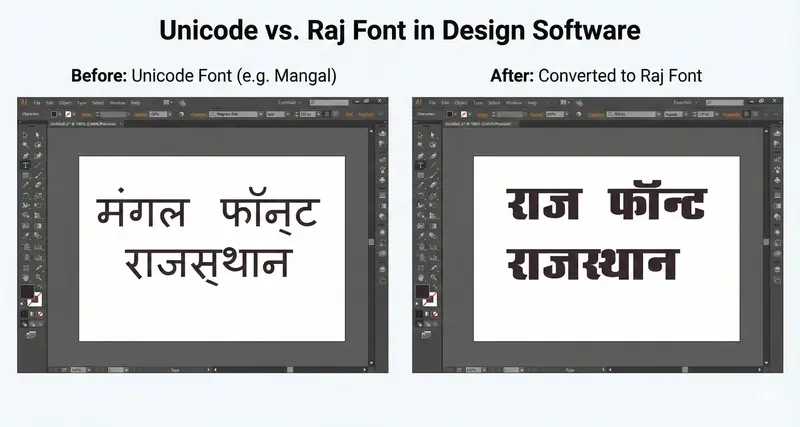
The Raj Hindi Font pack is celebrated for its exceptional versatility and is a favorite among graphic designers for creating eye-catching banners, intricate wedding cards, and dynamic creative templates. Modern systems and web browsers mostly use Unicode fonts like Mangal or Nirmala UI. But design software like Adobe Photoshop, CorelDraw, and PageMaker often have trouble showing Unicode characters, especially Hindi matras, correctly. This converter bridges that gap by transforming your text into the legacy Raj format, guaranteeing perfect compatibility and ensuring high-quality design outputs.
The Raj Font is more than just a legacy typeface; it's a comprehensive solution designed with designers in mind. The Raj pack functions as a "mix of all Hindi fonts," offering distinct styles crucial for various design elements. It provides a Bold variant perfect for prominent headings, a Medium weight ideal for body text, and a thin style for achieving elegant, refined details. This versatility makes it a go-to choice for achieving specific visual aesthetics.
🚀 Pro Tip: Need Raj Bold or Calligraphy
styles?
Convert your text here first, copy the output, and then apply any "Raj" font family variant
in
your design software!
Why Designers Prefer Raj Font Over Unicode
Graphic designers and DTP professionals gravitate towards the Raj Font for several compelling reasons, which often outweigh the convenience of universally compatible Unicode.
- Versatile Styles: The Raj pack acts as a "mix of all Hindi fonts," offering Bold for headings, Medium for body text, and thin for elegant details, allowing for greater creative control.
- High Quality & Print Readiness: Known for its 600 DPI resolution, Raj Font ensures crisp and sharp text rendering, crucial for large-scale prints like hoardings and flex banners.
- Ease of Use: Once installed, integration is straightforward. Convert Unicode text to Raj encoding using this tool, and start designing in your preferred software without complex setup.
Best For Design & Print
The inherent strengths of the Raj Font make it the preferred choice for high-impact print applications where stylistic flair is essential.
- Wedding Cards: The specialized Raj Calligraphy fonts offer beautifully stylized curves, perfect for the traditional and elegant aesthetic of Indian wedding invitations.
- Flex Banners: The robust Bold variants provide excellent readability from a distance, making them a top choice for advertising materials like flex banners and hoardings.
- Templates: Raj Font is a reliable choice for creating reusable Hindi design templates, ensuring text renders correctly across different software versions.
Raj Font vs. Unicode – Which is Better for Photoshop & CorelDraw?
The ongoing debate between embracing modern technology like Unicode fonts and maintaining creative freedom with legacy formats like Raj Font often surfaces when working with professional design software. Unicode is the standard for web and digital use. But Adobe Photoshop and CorelDraw can have big problems showing detailed Hindi typography.
Raj & KBC Fonts
🏆 Best for PrintZero "Broken Matra" Issues
Raj Font maps Hindi characters to English keys (ASCII). Photoshop treats it like simple English text, so complex vowels (like 'ि' in 'कि') never break or displace, even in older versions.
Artistic & Heavy Weight
Raj fonts come in Heavy Bold, Condensed, and Calligraphy styles, essential for creating eye-catching Flex Banners, Hoardings, and Wedding Cards.
Legacy File Support
Using Raj Font ensures you can seamlessly edit older client files (.CDR, .PSD) without text turning into garbage characters.
Unicode (Mangal)
🌐 Best for WebThe Rendering Glitch
Ever typed "कि" and saw "क ि" with a gap? That's the Unicode engine failing in Adobe software. Fixing this for every text layer is a major headache.
Lack of "Flair"
Unicode fonts like Mangal are designed for screen readability (WhatsApp) and lack the decorative curves needed for professional Wedding Invitation designs.
💡 Verdict: Use Unicode for websites & WhatsApp. Use Raj Font for Photoshop, CorelDraw & Printing.
How to Use Raj Font in Photoshop & CorelDraw
Leveraging the power of Raj Font is straightforward. Convert your Hindi text to Raj encoding to ensure perfect rendering without "broken matra" issues. Use Converter Above
- Type in Unicode: Begin by typing your desired Hindi text using Google Input Tools or your smartphone keyboard (e.g., "नमस्ते").
- Paste & Convert: Paste that Unicode text into the Left Box (Mangal) of our converter above. The tool will instantly convert it to Raj code in the Right Box.
- Copy Code: Click the "Copy" button on the Raj Output box to copy the converted Hindi text.
- Paste in Software: Open Adobe Photoshop or CorelDraw, select the Text Tool, and choose a "Raj" font family (e.g., Raj 08, Raj Bold).
- Paste and Witness Perfection: Paste the text. It will render perfectly, with all matras and conjuncts displayed correctly, exactly as intended for your print design.
This method is essential for high-quality designs. By converting from Unicode to Raj, you bypass rendering limitations.
Conclusion: Embracing Legacy for Modern Excellence
The Unicode Standard has become the main system for global communication, ensuring text is understood everywhere. However, the transition from legacy font systems to Unicode has challenges in specialized design. This Unicode to Raj Font Converter serves as a crucial bridge, enabling you to harness the stylistic advantages of legacy fonts within modern workflows.
Graphic designers making content in Hindi must understand font conversion. Converting Unicode fonts to Raj Font or Krutidev Font helps keep designs for Wedding Cards and Flex Banners free of errors.
Ideally, you can also use our PDF Tools to manage your final design documents. Embrace the power of conversion to elevate your Hindi typing and design projects to new heights!
Ready to design?
Start Converting NowHow to use Hindi in Photoshop CS/CC & CorelDraw? ▼
Type your text in Unicode Hindi (Google Input), paste it into the left box here, and copy the Raj Code from the right box. In Photoshop & CorelDraw, select 'Raj 04' or 'Raj 08' font and paste the code.
Is Raj Font free to use? ▼
Yes, the Raj Hindi font pack is generally available for free download. However, this tool only converts the text code; you must have the font installed on your computer to view it correctly in offline software.
राज फॉन्ट (Raj Font) का उपयोग कहाँ होता है? ▼
राज फॉन्ट का उपयोग मुख्य रूप से बैनर डिजाइन, शादी के कार्ड, और फ्लेक्स प्रिंटिंग में होता है क्योंकि यह फोटोशॉप में मात्राओं को तोड़ता नहीं है।
क्या यह कन्वर्टर मोबाइल पर काम करता है? ▼
जी हाँ, यह टूल पूरी तरह से रिस्पॉन्सिव है। आप मोबाइल पर टेक्स्ट कन्वर्ट करके कॉपी कर सकते हैं और डिजाइनिंग एप्स में पेस्ट कर सकते हैं।
