RajTool Logo RajTool
Official Step-by-Step User Manual Walkthrough

Rajasthan SSO Registration: Step-by-Step New SSO ID Guide

Learn how to create a new Rajasthan Single Sign-On (SSOID) account for free. Follow our official screenshot manual to register using Jan Aadhaar or Google, set up your credentials, and unlock 100+ state government services.

100% Free
Government Portal
Jan Aadhaar
Instant Verification
SMS / Email
Instant Delivery
Rajasthan SSO Portal Registration Process - Official User Manual
SSO Registration Guide
Official visual walkthrough of the Rajasthan Single Sign-On (SSO) account registration steps.
Illustrated User Manual

Official Steps to Register on Rajasthan SSO Portal

Follow each verified step below with official screenshots to register your Rajasthan SSOID without any errors.

Step 01 Portal Navigation

Step 1: Visit SSO Portal & Click on Registration

Open your web browser and visit the official Rajasthan SSO portal at https://sso.rajasthan.gov.in/. If you already have an SSOID, click Login; for new users, click on the "Registration" tab.

The registration tab directly opens the account creation wizard without requiring any preliminary login.
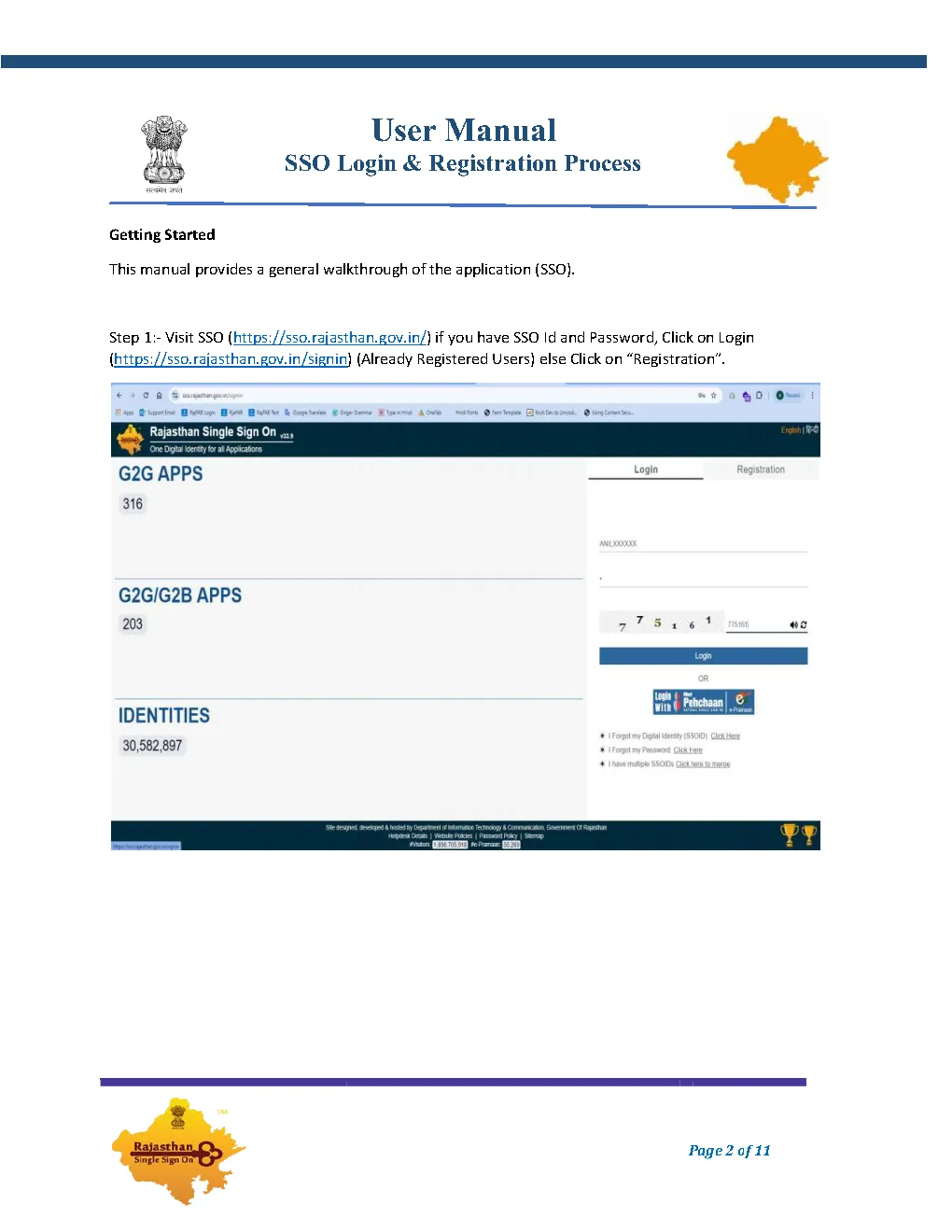
Step 1: Open SSO Rajasthan portal and click on Registration tab
Figure 1: Rajasthan SSO Homepage displaying Login vs Registration toggle.
Step 02 User Category

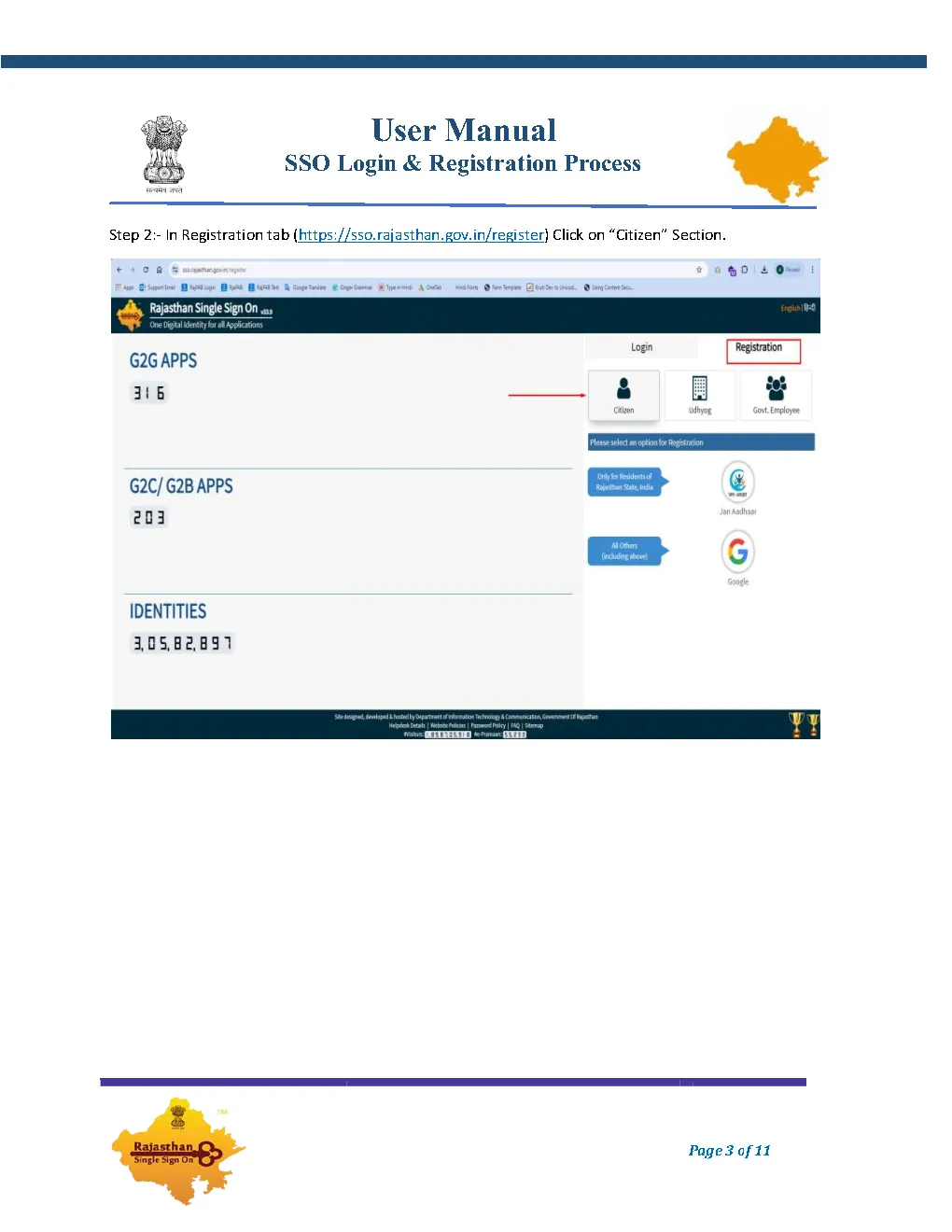
Step 2: Under Registration Tab, Click "Citizen"

Inside the registration area, you will see three main user categories: Citizen, Udhyog, and Govt. Employee. For general public use, competitive exams, recruitment forms, scholarships, and e-Mitra utility services, click on the "Citizen" tab.

State government employees should select "Govt Employee" (SIPF) instead, while business owners select "Udhyog" (BRN).
Step 2: Under Registration tab select Citizen category
Figure 2: Selecting the "Citizen" category on sso.rajasthan.gov.in/register.
Step 03 Verification Channel

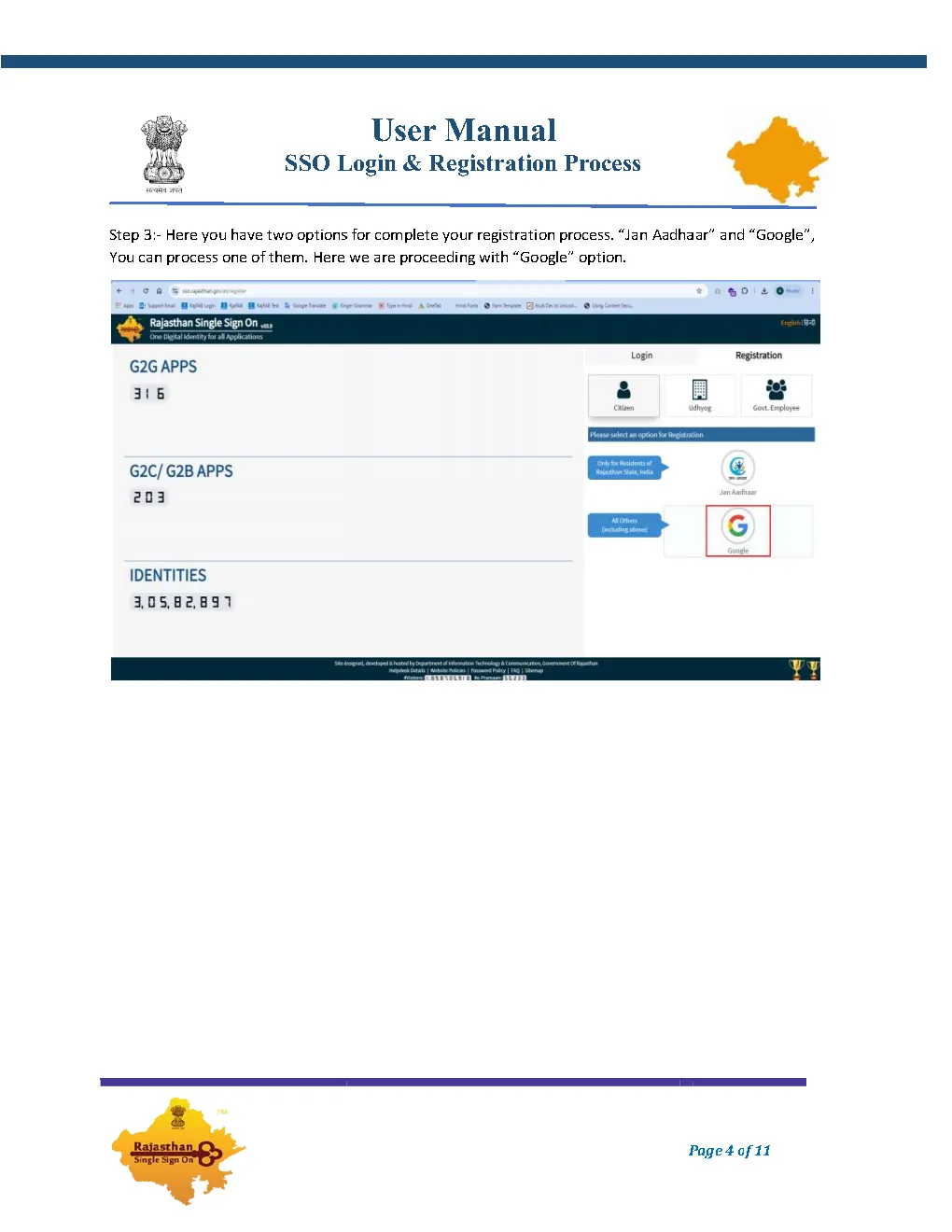
Step 3: Choose "Jan Aadhaar" or "Google" Option

You are presented with two primary authentication methods to complete registration:

  • Jan Aadhaar (Recommended for Rajasthan Residents): Enables full access to state subsidies, DBT, ration cards, and scholarships without separate verification.
  • Google Account (Recommended for Non-Rajasthan Candidates): Perfect for candidates from other states applying for Rajasthan government exams (RSMSSB, RPSC, REET).
Step 3: Choose Jan Aadhaar or Google option for registration
Figure 3: Choosing authentication method between Jan Aadhaar card and Google.
Step 04 Credential Setup

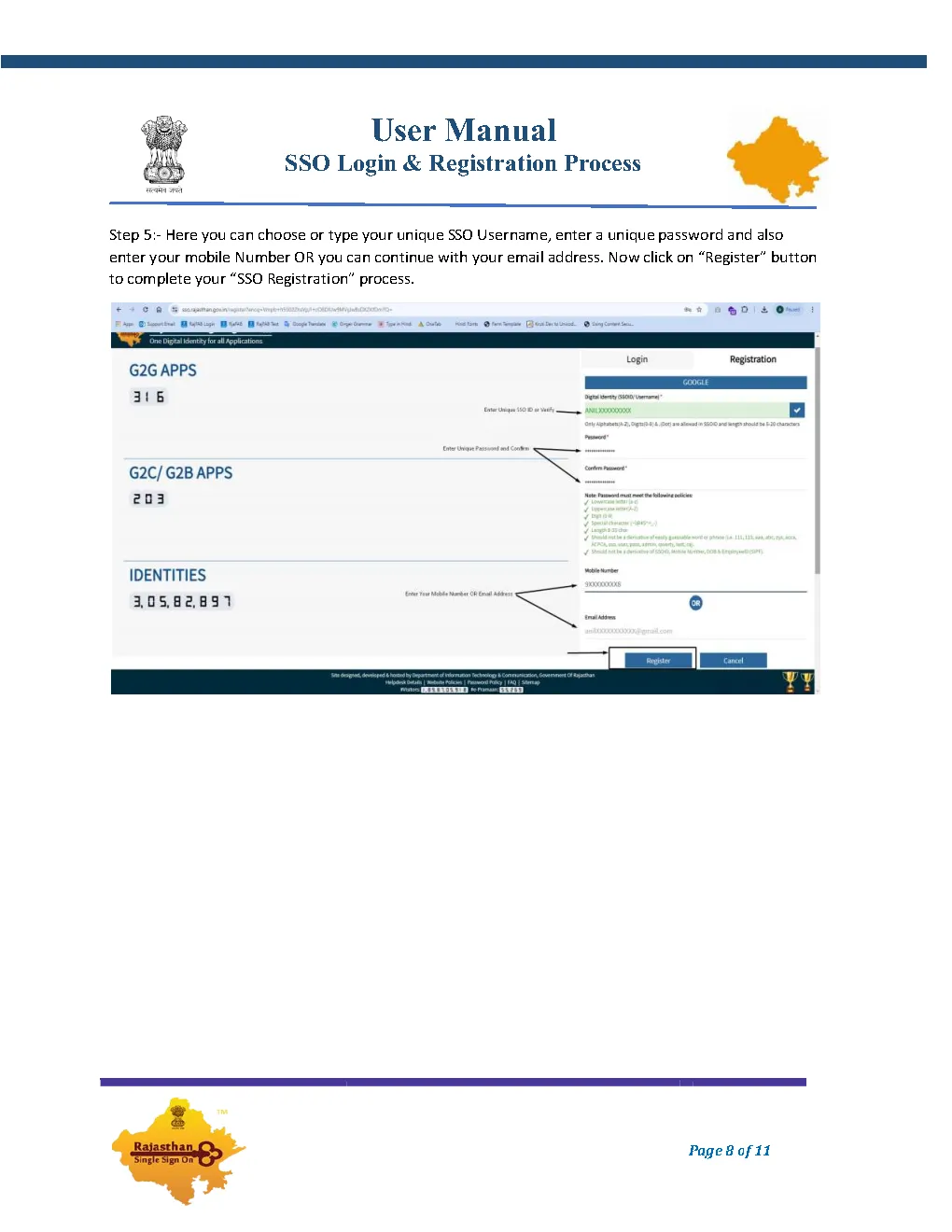
Step 4: Set Username, Password, Mobile & Click Register

In the profile setup form, enter your preferred SSO Username (must be unique). Enter a strong password and confirm it. Then, enter your active Mobile Number or verify your registered email address. Click the "Register" button to finalize.

Password Rule: Must be at least 8 characters long, containing uppercase letters, lowercase letters, numbers, and special symbols (e.g. Raj@2026#).
Step 4: Set unique SSO username password and mobile number
Figure 4: Choosing unique SSOID username, password, and mobile number.
Step 05 Confirmation

Step 5: Registration Success & SMS/Email Notification

Once you click "Register", an on-screen dialog confirms: "Registration Successful for SSOID: [Your_Username]". You will immediately receive a confirmation SMS on your mobile phone and an email containing your generated SSO Digital Identity.

Save this SMS or email securely, as your SSOID is permanent and cannot be changed later.
Step 5: Registration success confirmation message and SMS
Figure 5: Success popup confirmation and SMS notification receipt.
Step 06 Dashboard Access

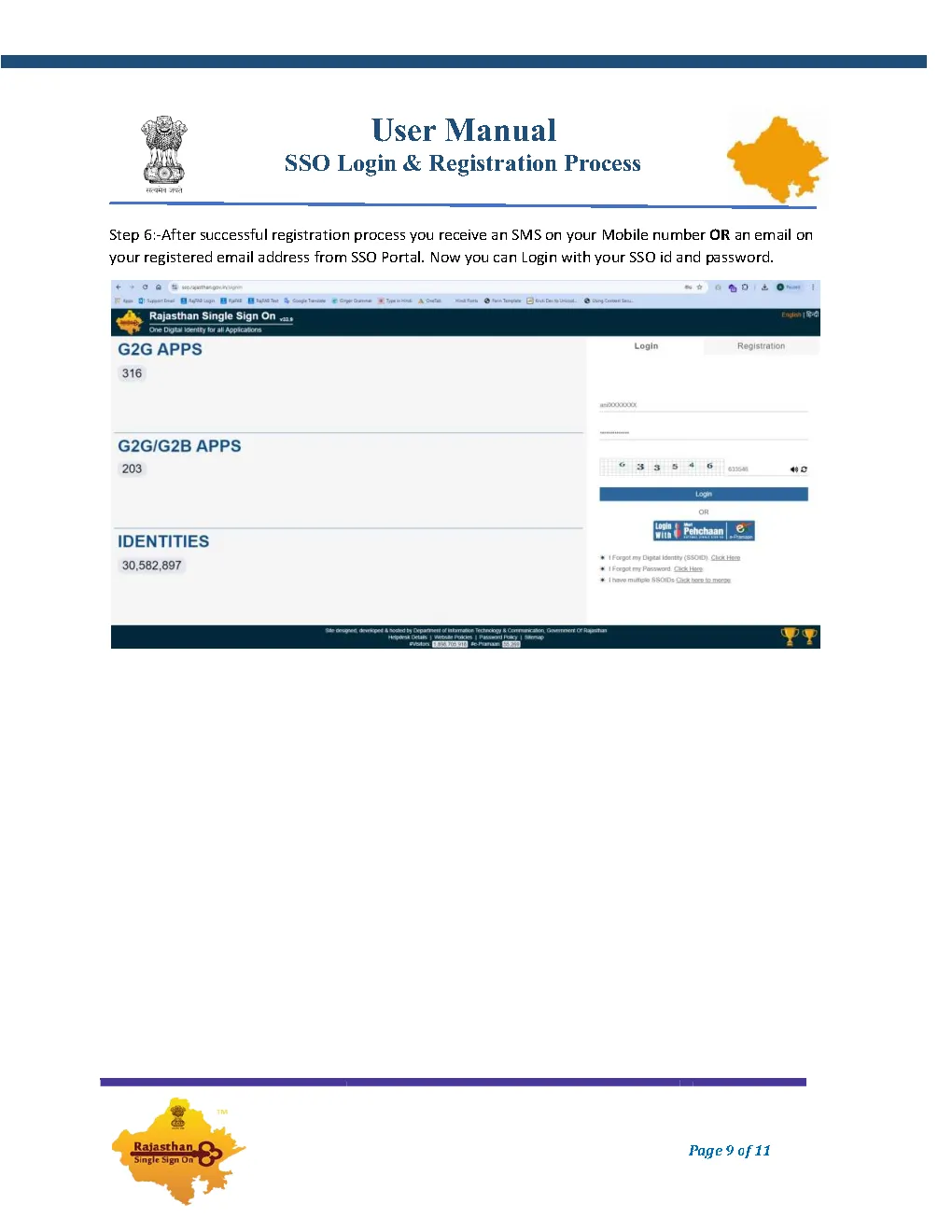
Step 6: Login & Access Rajasthan Government Apps

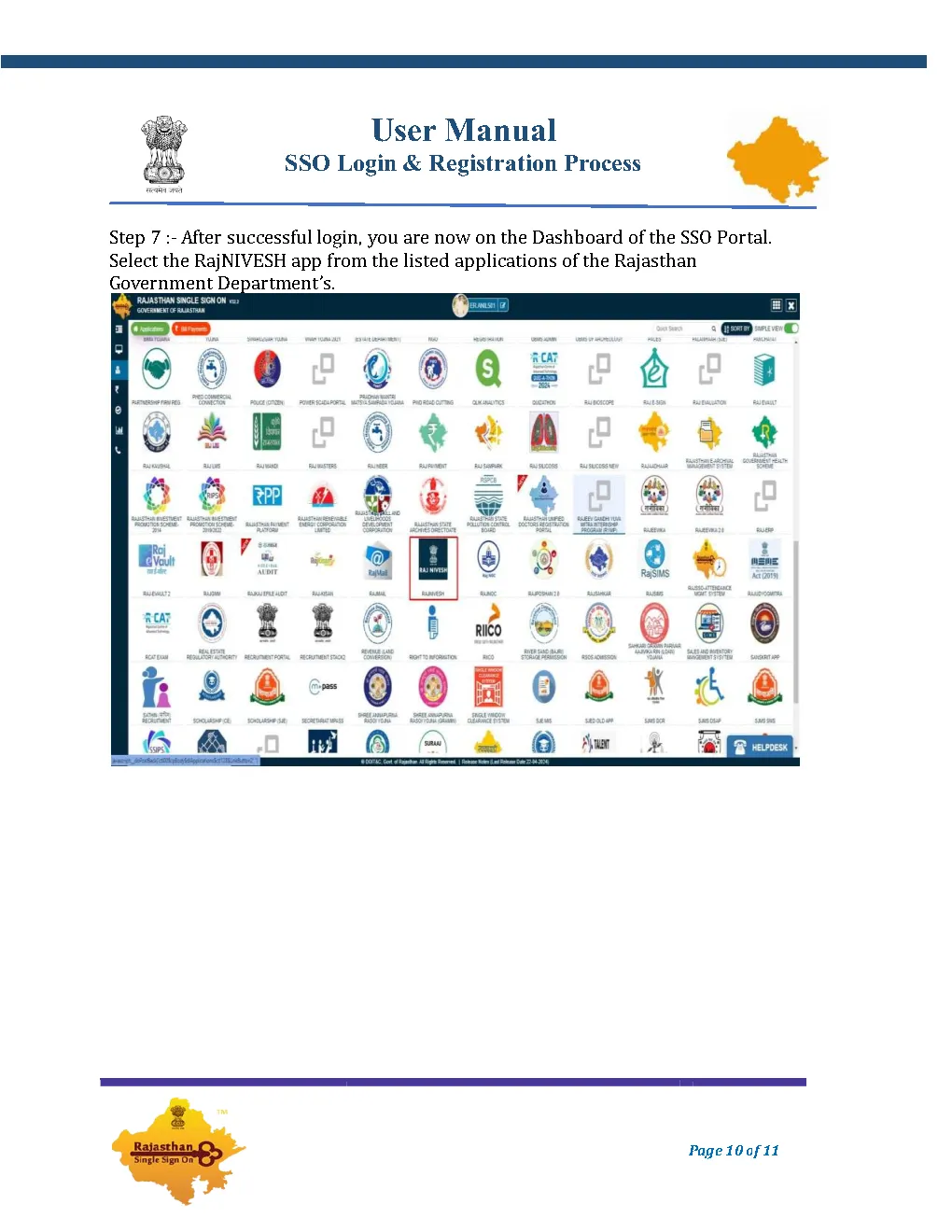
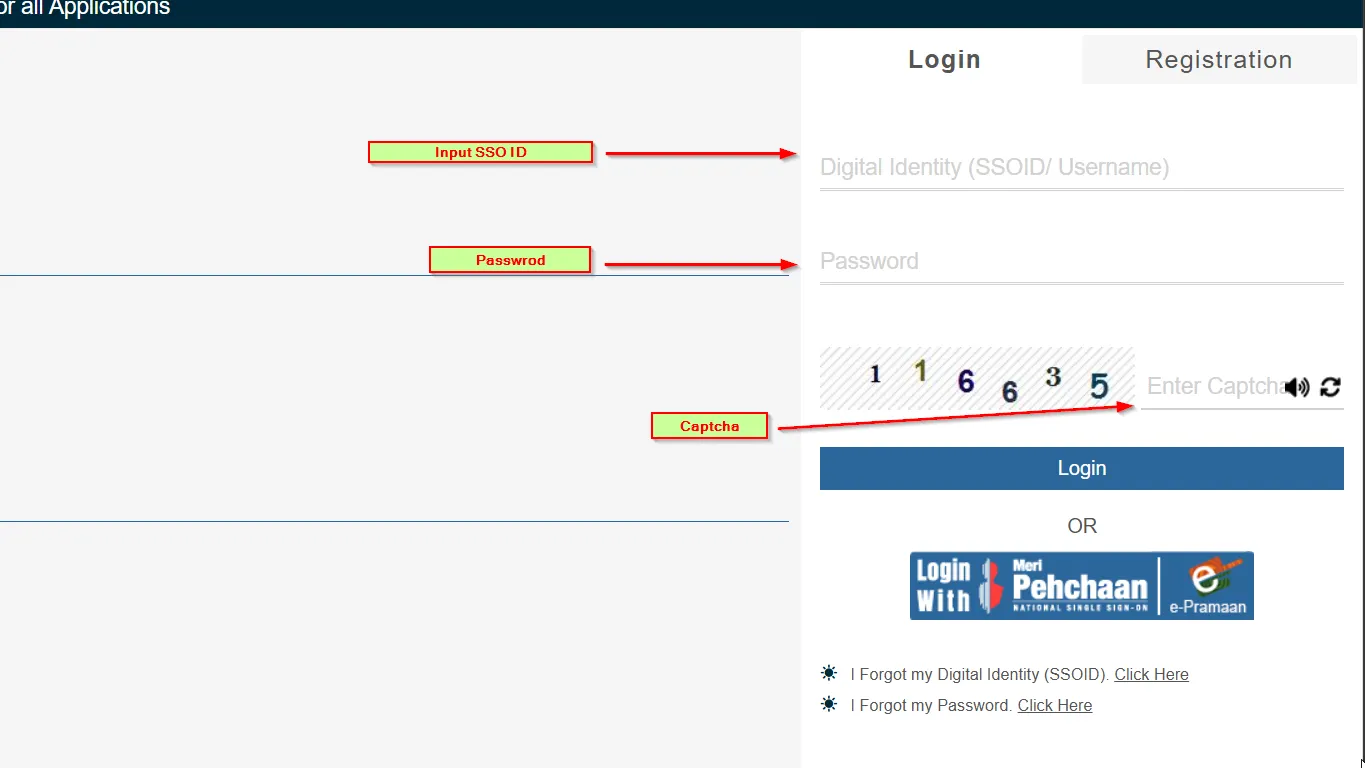
Now return to the login screen (sso.rajasthan.gov.in/signin), enter your new SSOID, password, and the 6-digit captcha code. You will be greeted with the full SSO Dashboard displaying hundreds of Rajasthan government apps such as RajNIVESH, e-Mitra, Recruitment Portal, and Scholarship.

Step 6: Dashboard of SSO portal with government department applications
Figure 6: Successful login displaying the personalized SSO citizen applications dashboard.
Essential Tips Before You Register

Prerequisites & Best Practices for Rajasthan SSO ID

To guarantee your registration completes without rejection or verification failure, keep these critical points in mind:

Active Mobile Number

Ensure your mobile number is active and capable of receiving SMS messages, as OTP verification is mandatory for security.

One ID Per Citizen

Do not attempt creating multiple SSO accounts with different emails. One citizen is legally mapped to one Jan Aadhaar profile.

Strong Password Security

Avoid easy passwords like your date of birth or name. Never share your password or OTP with unknown kiosk operators.

Official Helpdesk Access

If you experience duplicate account errors, call the state DoIT&C helpdesk directly at 0141-2925554 / 0141-2925555.

Common Questions

Frequently Asked Questions (FAQ)

Everything you need to know about creating and managing a Rajasthan SSO ID.

For Rajasthan residents, having your 10-digit Jan Aadhaar number or Aadhaar enrollment ID is sufficient. Non-residents can simply register using their Google (Gmail) credentials. No physical documents need to be uploaded during the initial registration process.

Yes. Creating an SSO ID on sso.rajasthan.gov.in is 100% free of charge provided by the Department of Information Technology & Communication, Government of Rajasthan.

No. One citizen should hold only one SSO ID. Having multiple IDs causes data conflicts in Jan Aadhaar synchronization, exam hall ticket generation, and pension payments. If you forgot your old ID, use the recovery process instead of registering anew.

If OTP is not received, verify that your mobile number is correctly updated in your Jan Aadhaar family record. Alternatively, you can complete initial registration via Google and link your Jan Aadhaar number later inside your SSO profile settings.

Ready to Create Your Rajasthan SSO ID?

Join over 3 Crore citizens registered on Rajasthan Single Sign-On. Click below to begin your free registration on the official portal.