
Rajasthan SSO ID Login
Access all Rajasthan government online services, e-Mitra, recruitment forms, scholarships, and Jan Soochna through one single identity (SSOID). Follow our verified login steps or sign in directly to the official state portal below.
Quick Access & Official SSO Rajasthan Sign In
Choose your required task below to quickly jump to the right section or open the direct government service portal:
Step-by-Step Guide: How to Log In to SSO Rajasthan
Follow these 4 simple steps to authenticate your Digital Identity and access the Rajasthan State SSO dashboard safely.
Step 1: Open the Official SSO Rajasthan Portal
Launch any modern web browser (Google Chrome, Microsoft Edge, or Firefox) and navigate to
the official portal URL:
https://sso.rajasthan.gov.in/signin.
https:// and contains rajasthan.gov.in. Beware of imitation
phishing websites.
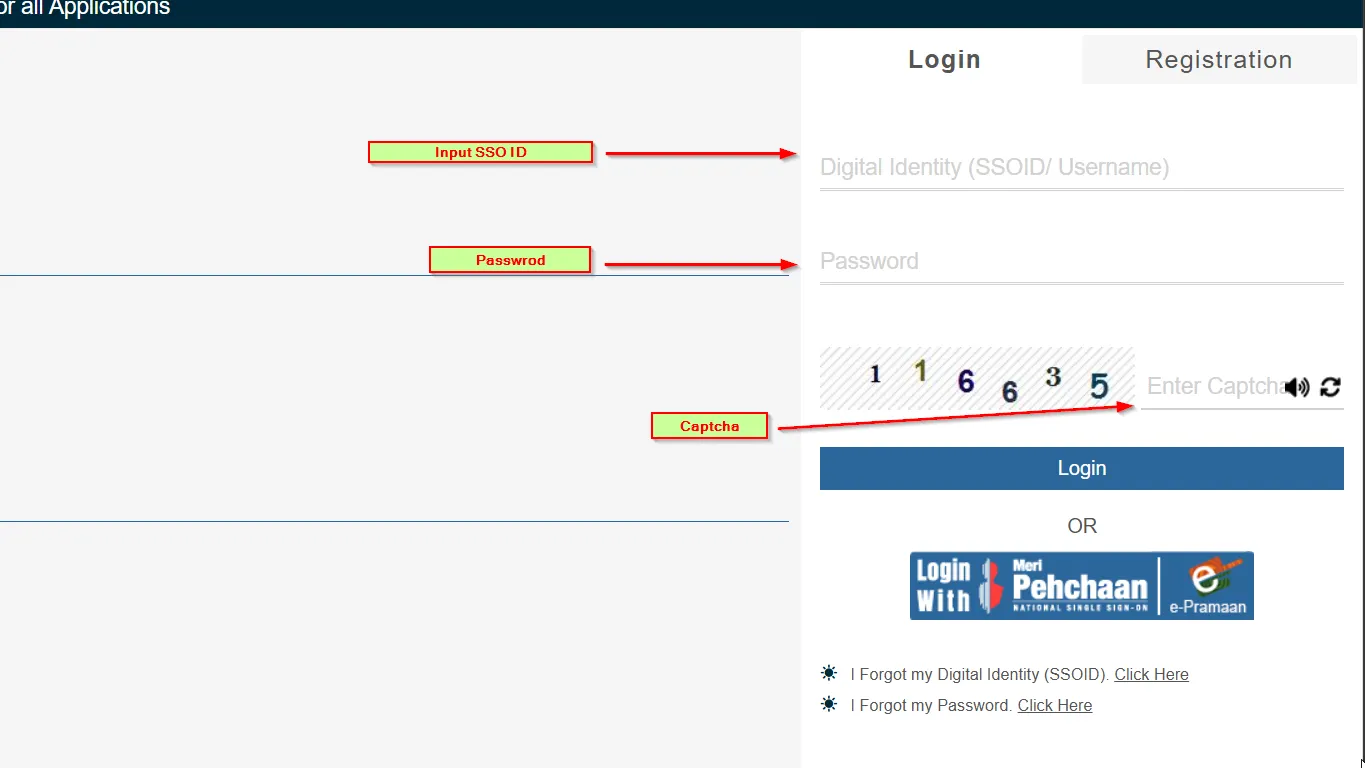
Step 2: Enter Your Digital Identity (SSOID) & Password
On the sign-in form, enter your registered Digital Identity (SSOID / Username). In the field directly beneath, enter your confidential account Password.
Step 3: Fill in the 6-Digit Captcha Verification Code
Look at the numeric security image displayed on the login card. Enter the exact 6-digit captcha code in the provided text box.
Step 4: Click Login to Access Your Citizen Dashboard
Press the green "Login" button. If your credentials and captcha are valid, the system will redirect you to your personalized Rajasthan Single Sign-On dashboard with access to all integrated G2C and G2G apps.
Click below to open the official government sign in page in a secure new tab.
Need to Register a New Rajasthan SSO ID?
If you do not have an SSO account yet, check out our dedicated user manual with official screenshots for Citizens (Jan Aadhaar & Google), Government Employees (SIPF), and Businesses.
How to Recover Forgot SSOID or Reset Password
If you have lost your login username or forgotten your password, use the official recovery mechanisms below.
Forgot SSOID Recovery Process
On the signin page, click on "I Forgot my Digital Identity (SSOID)". Select your recovery method:
- Jan Aadhaar: Enter Jan Aadhaar number & receive SSOID via SMS.
- Aadhaar Card: Authenticate via UIDAI OTP.
- Google Account: Sign in with the linked Gmail ID.
Forgot SSO Password Reset Steps
Click "I Forgot my Password" on the portal:
- Enter your active SSOID.
- Choose OTP verification via Mobile SMS or Registered Email.
- Enter the 6-digit OTP code received.
- Set a strong new password with uppercase, numbers, and special characters.
SMS-Based Quick SSO Retrieval
You can also recover your SSO ID instantly via SMS from your registered mobile number:
*Standard SMS charges may apply. Must be sent from the mobile number registered in your SSO profile.
Major Government Services Available on Rajasthan SSO
Once you log in to the Rajasthan SSO portal, your single Digital Identity (SSOID) grants you instant access to over 100+ integrated citizen portals, government schemes, and departmental apps.
Core Flagship Government Portals
Complete citizen service kiosk network for electricity, water bill payments, domicile, caste certificates, and ration services.
Unified recruitment stack for submitting online competitive job applications, downloading admit cards, and tracking answer keys.
State cashless health coverage and accident insurance scheme (Durghatana Bima) linked directly with Jan Aadhaar identity.
Central social security database for Direct Benefit Transfers (DBT), Palanhaar assistance, social pensions, and scholarships.
Directory of Integrated Citizen & Departmental Services
Browse by department category or type a service name below for instant live search.
How to Launch Citizen Services After SSO Login
After signing in to sso.rajasthan.gov.in with your credentials:
*All services require authentication through your verified Rajasthan Single Sign-On (SSOID).
Sign In to Access ServicesOfficial Rajasthan SSO Helpline & Support Desk
For technical glitches, account lockout, Jan Aadhaar sync errors, or server issues, connect directly with the Department of Information Technology & Communication (DoIT&C) helpdesk team.
Department of Information Technology & Communication (DoIT&C),
IT Building, Yojana Bhawan, Tilak Marg, C-Scheme, Jaipur, Rajasthan • PIN 302005
Frequently Asked Questions (FAQ)
Common queries and authoritative answers about Rajasthan Single Sign-On (SSO) login.
The official direct URL for the Rajasthan SSO login portal is https://sso.rajasthan.gov.in/signin. Always make sure the browser address bar shows the verified green or closed lock symbol indicating SSL security.
Yes. Jan Aadhaar is the primary authentication gateway for residents of Rajasthan. During new registration or identity recovery, entering your 10-digit Jan Aadhaar number sends a verification OTP to the registered mobile number, automatically creating or linking your SSO profile.
If you input an incorrect password multiple consecutive times, your account may temporarily lock for security. You can unlock it by clicking on "I Forgot my Password" on the sign in page and completing OTP verification, or by contacting the state helpdesk at 0141-2925554 / 0141-2925555.
Sign in to your SSO dashboard, look at the top-right header where your name appears, and click on the "Pencil" (Edit Profile) icon. In the profile update form, change your mobile number, verify it using the OTP sent to the new number, and click "Update".
No. Registration and access to the Rajasthan Single Sign-On (SSO) portal is completely free of cost provided by the Government of Rajasthan. Do not pay any fees to unauthorized third-party websites.
Start Using Rajasthan SSO Services Today
Connect to hundreds of Rajasthan government services with just one login. Click the button below to open the official sign in portal.
https://sso.rajasthan.gov.in/signin